Download the G4I App
Maximize your meeting experience
Search for “Kenes Connect” in your app store, or scan the QR-code in the image, to download the G4I 2026 App.
After installing the app, insert your registration email, registration ID, and the event code “G4I26“.
Enjoy the app!
App Features
• General Information
• Full Program & Speakers
• Personalize Your Schedule
• Find Colleagues from a Specific Country
• Venue Information
• …and more!


Improve Your Personal Information
Networking during the GovTech 4 Impact World Congress is important. It’s essential to make sure you’re connecting with the right people. To help others find you and to present yourself professionally, ensure that your personal information is complete and up-to-date. Here’s how you can edit your profile:
Open the G4I 2026 Congress app on your device.
Find the section labeled ‘Personal Area’ and tap.
Click on ‘Edit My Profile’ to begin editing your details.
Update your information and save the changes.
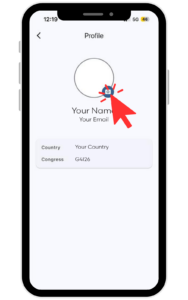
To update your profile picture, tap on your user icon from the homepage.
Tap the edit icon next to your image to upload or update it, then save.